
How to Download Your Invoice
You can download invoices and receipts for any purchase or renewal from the billing portal in My Account. Use this when you need a PDF copy for bookkeeping or reimbursement.
Open the billing portal
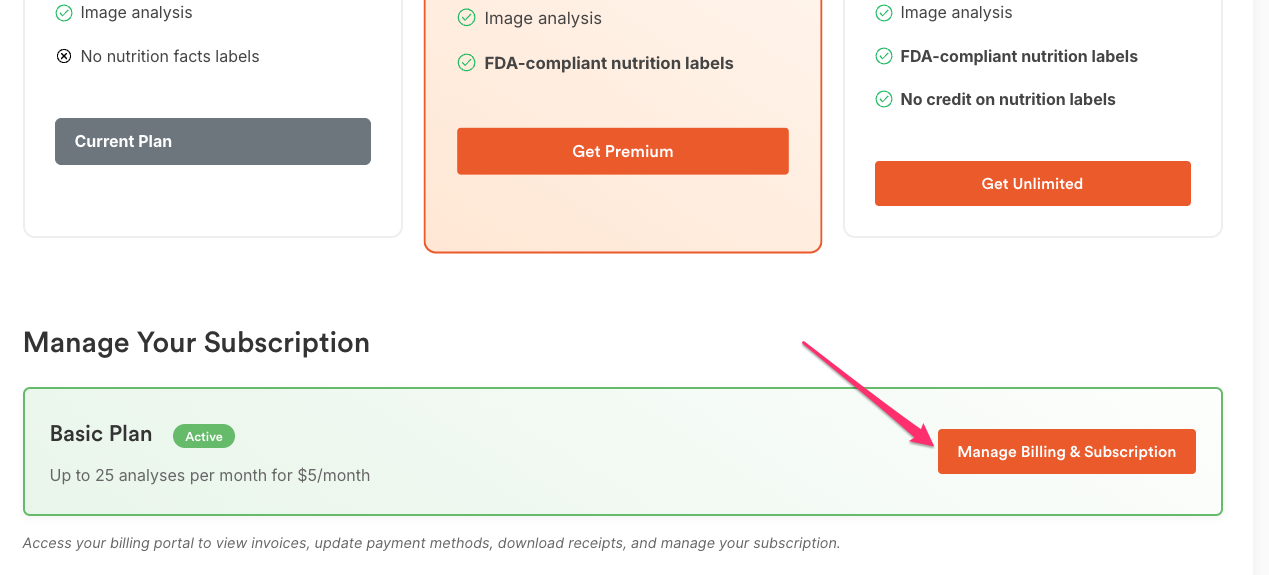
Go to My Account → Manage Your Subscription and click Manage Billing & Subscription to open the portal.
Find your invoice

The Invoice History section lists all charges (initial purchases and renewals).
Tip: Use the search icon to quickly find an invoice by date, amount, or reference.
Download as PDF
- Click the invoice you want. A new window opens with the purchase details.
- Click Download Invoice to get the official tax invoice.
- Or click Download Receipt to get a payment receipt.
- Save the file to your device when prompted.

Tip: If the invoice window doesn’t open, allow pop-ups for recipecard.io and try again.
Notes
- Invoice vs. Receipt: The invoice is your formal billing document; the receipt confirms payment.
- If you don’t see an expected invoice, the charge may be pending. Check back later or contact support with your account email and order ID.