
How to Manage Your Subscription
You can upgrade or cancel your Recipe Nutrition Analyzer subscription from your account at any time. The billing portal is available in My Account and takes you through the change step-by-step.
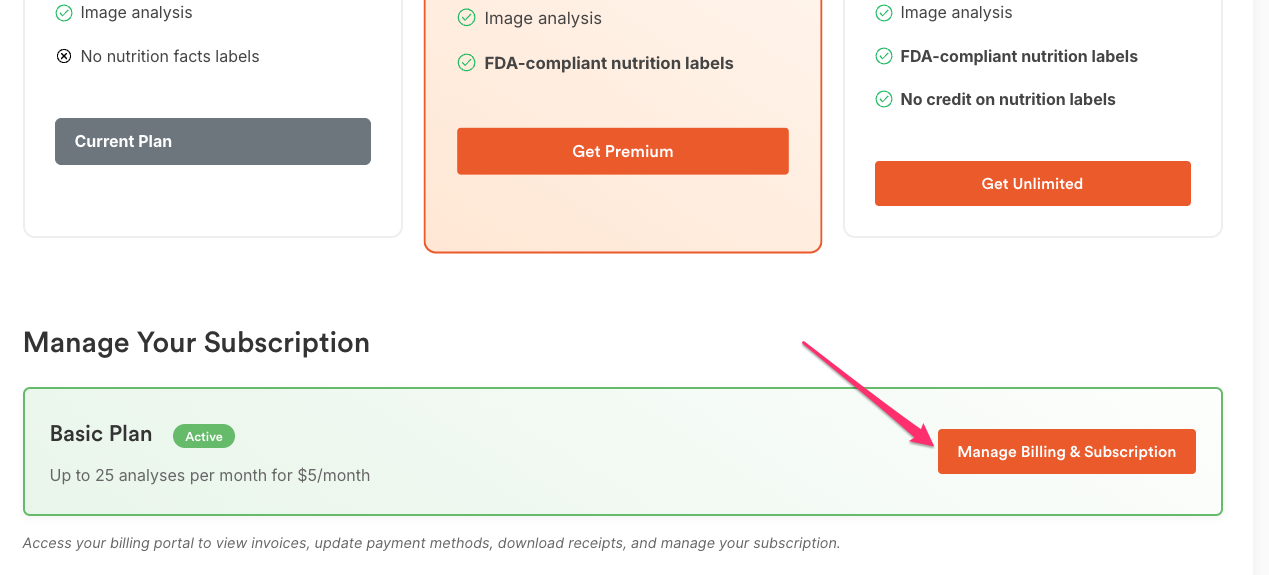
Open the billing portal
Use this to view your current plan and make changes.
- Go to My Account.

- Scroll to Manage Your Subscription.
-
Click Manage Billing & Subscription to open the billing portal.
Upgrade your plan
Upgrade when you need more features or want to switch to a higher monthly/yearly plan.
- In the billing portal, click Upgrade subscription.

- Select the new monthly or yearly plan.
- Click Continue and follow the checkout steps to confirm the upgrade.

Note: You’ll see the new plan details during checkout. Finish the payment to apply the upgrade.
Cancel your subscription
Cancel if you no longer want your plan to renew.
- In My Account → Manage Your Subscription → Manage Billing & Subscription, click Cancel Subscription.
- Confirm the cancellation when prompted.

After canceling, auto-renewal stops. You can subscribe again anytime from your account or Pricing page.
Tips
- If you don’t see Manage Billing & Subscription, make sure you’re logged in with the same email used at purchase.
- For billing questions or failed payments, contact support with your account email and order ID.